How to obtain the Income Tax reference with a certificate or electronic ID
Using the electronic certificate you can obtain the reference of the Income Tax file immediately; With it you can manage and streamline all Income Tax services, prepare the declaration using the Renta WEB service and submit it online, regardless of the result of the declaration.
From the day March 11, 2026The references obtained during the 2024 campaign cease to have effect. If you want to continue operating with a reference to access Income services, you will need to obtain a new reference valid for Income 2025 services.
Remember that the reference is shown directly on the screen or in the APP.
To obtain a reference using the electronic certificate access the "Get your reference number" option in the "Procedures" section.
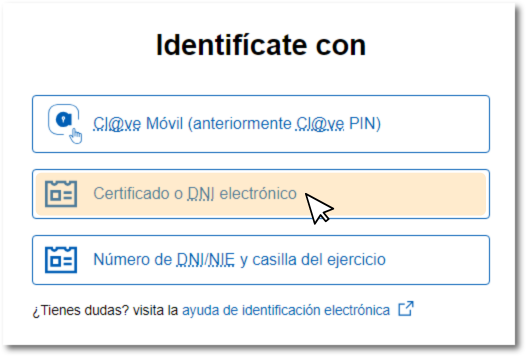
In the "Identification" window, click on "Certificate or electronic ID ".
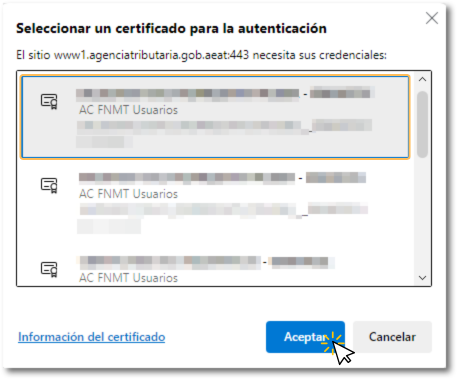
Then, select the electronic signature in the browser's certificate selection window.
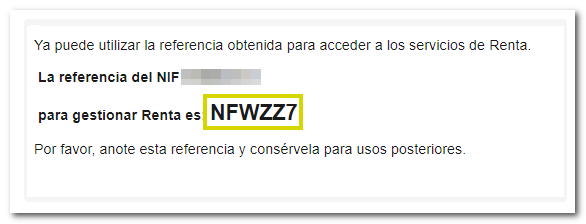
The 6-character reference to manage Income will be displayed. Please write down or copy this reference for later use. However, you are allowed to obtain up to 10 Renta references per day and each of the references received will be different and will automatically revoke the one previously generated.
Please note that if you have obtained a reference from the APP, obtaining a new one through the browser will revoke the previous one, so you will have to identify yourself again on the mobile device. Remember that only the last reference generated will be valid, either through the APP or from the website.
Once you have obtained the reference, you will be able to manage any of the available Income services or those that allow identification in this way, such as requesting a tax certification. PIT. From the Renta portal, access "Renta WEB: "Draft/declaration processing service" to generate your declaration, complete it if necessary and submit it. We inform you that for the calculation and presentation of joint declarations, the spouse's file reference or identification with Cl@ve will be essential.
Enter your DNI or NIE , the reference you just obtained and press "Accept"; you will then access your Income Tax file, where in the "Available Services" section you can check the procedures enabled for you at that time. Click on "Draft/Declaration (Income Tax WEB)" to generate the draft with the tax data available to you. AEAT At that time, although you can add any other data that is not reported or "Draft/Declaration (DIRECT Income)" if you meet the requirements for this group.
If you want more information about managing the reference from the Tax Agency APP, you can consult the help "User management in the APP- AEAT ".