Issues obtaining an electronic copy or full enquiry
Skip information indexProblems obtaining an electronic copy in Microsoft Edge
First of all, check in your browser that the toolbars you have installed (Yahoo, Google, MSN...) are not blocking pop-ups within the Tax Agency website. If you wish, you can remove this type of blocker from "Control Panel", "Programs", "Programs and Features" or from "Settings", "Applications", "Applications and Features".
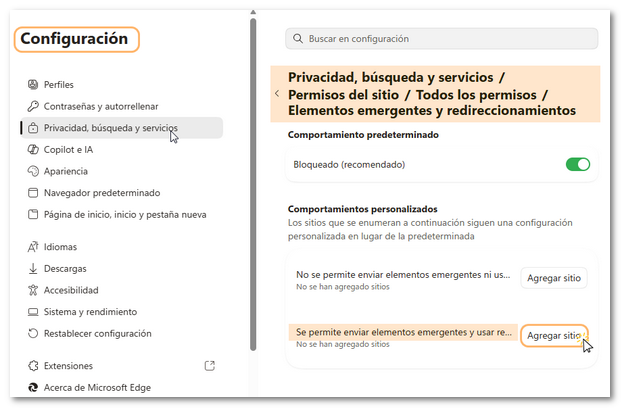
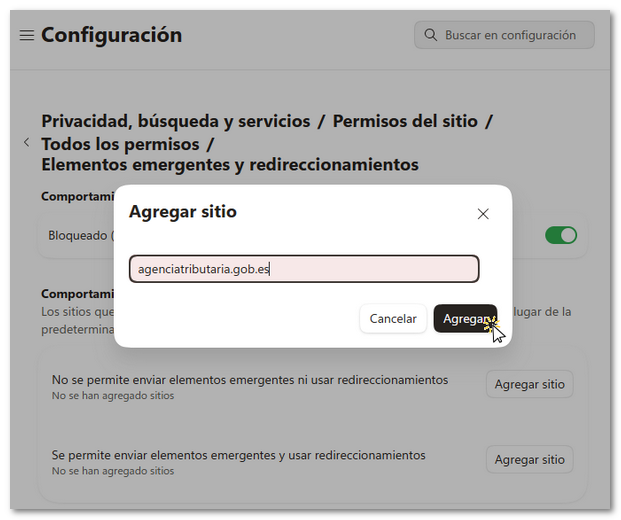
Also check in your browser that the "Block" option is unchecked, at least while you are performing the search. Go to "Settings and more", or the three horizontal dots icon at the top right, "Settings". Once there, select "Privacy, search and services" on the left margin, "Site permissions", "All permissions" and click on "Pop-ups and redirects". In the new window, uncheck the "Locked" box. If you only want to allow pop-up windows from the website of the AEATClick on "Add site" in the "Allow sending pop-ups and using redirects" section and enter the following address: agenciatributaria.gob.es. Click "Add".
Antivirus and firewall software can also interfere with this process.
As for the rest of the requirements to obtain a copy of a declaration, remember that it is necessary to have a PDF document viewer.
You can also check the installed versions in "Programs and Features" in the Control Panel. Please note that your operating system will normally be running the most recent version you have installed by default.