Form 036
Skip information indexHelp service for filing Form 036 (WEB Census)
He "Service for processing form 036 (WEB Census) for individuals (Initial registration, Deregistration, or Change of address)" It is primarily aimed at providing assistance to individuals who, at the time of access, are NOT registered in the Census of Businesspeople, Professionals and Withholders, carry out their activities in the Peninsula and the Balearic Islands or are part of an entity under the income attribution regime of PIT and there is no record of the prior submission of a pending census form to register in the census. Access to this service is available in the list of procedures for Form 036 on the Electronic Office.

You can access by identifying yourself with Key, electronic certificate or DNIe with reader. If you have questions about how to obtain an electronic certificate or how to register in the Cl@ve system, consult the information available in the related content.
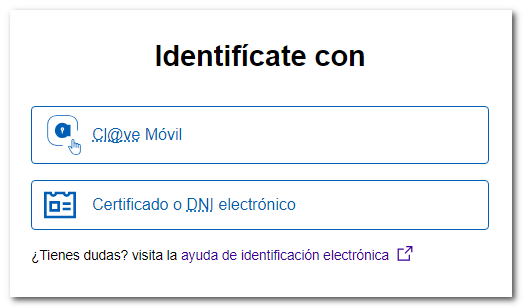
If the declarant accesses with his own certificate or with Key will carry out the procedure on his own behalf.

If the declarant does not have an electronic certificate or is not registered in Key, the presentation can be made by another person provided that they are authorized to submit declarations on behalf of third parties, through the corresponding power of attorney to carry out the procedure that allows the visualization of census data and presentation of the census form.

If you are not authorized, the following message will be displayed:

Upon accessing the service, the application verifies whether the individual taxpayer is already registered in the census of business owners, professionals, or withholding agents; In this case, it only offers the possibility of reporting the withdrawal from the census due to the cessation of activities or change of address.

If you are not listed in the census of business owners, professionals or withholding agents, the application will display a message saying "Advance instructions"indicating whether or not you can use this service, depending on whether you fall into any of the excluded situations.
If you fall into any of these exceptions, you must submit your census registration declaration using "Form 036. Census declaration of registration, modification and cancellation.

In case you have pressed "Continue"After reading the previous instructions, you will be able to navigate through the different data request screens, which will allow you to generate Form 036.
When completing the form, the characters included in the following list must be used:
| CHARACTER | TEXT | DECIMAL CODE | HEX CODE. |
|---|---|---|---|
| White | 32 | 20 | |
| & | Ampersand | 38 | 26 |
| Ç | Comilla | 39 | 27 |
| ( | Stop. Dr. | 40 | 28 |
| ) | Stop. Left. | 41 | 29 |
| , | Eat | 44 | 2 C |
| - | Script | 45 | 2D |
| . | Spot | 46 | 2E |
| / | Bar | 47 | 2F |
| 0-9 | Numbers | 48-57 | 30-39 |
| : | Two points | 58 | 3A |
| ; | Semicolon | 59 | 3B |
| A-Z | Letters | 65-90 | 41-5A |
| _ | Underscore | 95 | 5F |
| Ç | Cedilla | 199 | C7 |
| " | Double quote |
The @ character can also be used in the email field.
Complete the form with the information requested in each of the tabs: "Identification Information," "Addresses," "Representatives," and "Activities."

Please note that there are certain combinations of activities that are excluded from the use of this service, so if you include them on page 4, the application will display the following warning:

In this case, the button "Export" to save the completed information in a file that can later be imported into the 036 form.

Once the form has been completed correctly, several options are offered:
-
"Validate statement" It enables the verification and correction of possible errors or missing information before submitting the model. When executing the action, remember that if the declared information requires documentary justification. This notice will also be shown on the presentation receipt.

-
"Preview" generates a PDF with the preview of the model to be presented. Please note that you will need a document viewer to view it. PDF.


-
"File a statement" from where you send the completed declaration.

The "Submit Return" button will not be available until the minimum information required to register the taxpayer in the Census of Business Owners, Professionals, and Withholding Taxpayers is completed. To do so, you must answer the questions displayed in the "Previous Questions" tab and then access the "Applicable Regimes" section.


Once this is done, there are other tabs with optional additional information that are also worth reviewing.
Once this process is completed, you will be asked for confirmation by clicking the "Submit Declaration" button.

The next window will show you the details of the person filing the form and on whose behalf they are filing it.
It also allows you to view the file with the information to be sent. Check the "I agree" box and click "Sign and Send."

The result of a correct submission of a form 036 will be a response sheet with the text "Your submission has been made successfully" with an embedded PDF containing a first sheet with the submission information (registration entry number, Secure Verification Code, receipt number, day and time of submission and details of the submitter) and, on the subsequent pages, the complete copy of the declaration.
There are cases in which it will be necessary to provide supporting documentation to process the option or reason for which form 036 is submitted. In these cases, the proof of submission that the taxpayer will obtain will contain an indication warning that the submission will not take effect until the required documentation has been submitted and verified.
To submit the required documentation you can access with electronic certificate, DNIe or Cl@ve through the "Provide additional documentation" option. This application allows the transmission of documents in various formats that will be linked to the declaration by means of the file number or electronic reference.