Income Tax 2024
Skip information index2024 Tax Data Query
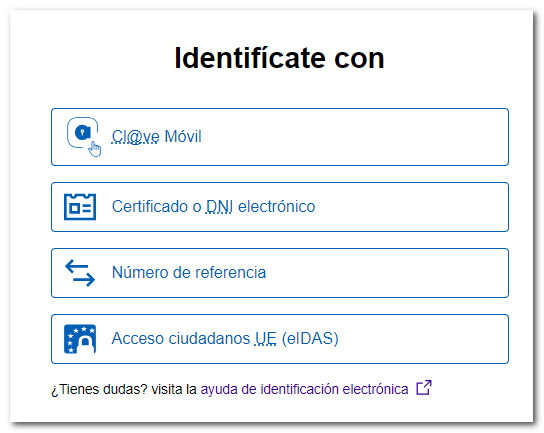
The consultation of tax data for 2024 is available on the procedures page for form 100, within the section "Previous years". Select the type of ID you want to use:
- With Cl@ve Mobile
- With certificate or electronic DNI ;
- With the reference number of the draft or income tax return for 2025;
- Using another country's identification as a citizen of the EU( eIDAS ).
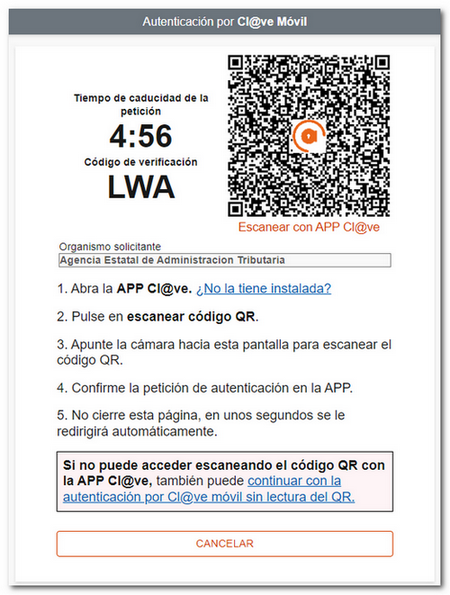
If you log in with Cl@ve Mobile Cl@ve You will need to scan the QR code with the APP Cl@veIn case the option to scan the QR code fails for any reason, you will also have the alternative of accessing with Cl@ve mobile phone without QR code reader, where you will need to enter the data of the ID card either NIE plus the contrast data, or if you don't have the user activated in the APP Cl@ve If you haven't installed it yet, wait about 60 seconds for the "Log in with" option to activate. Cl@ve Mobile Cl@ve by SMS"to obtain a PIN by sending the SMS to your mobile.
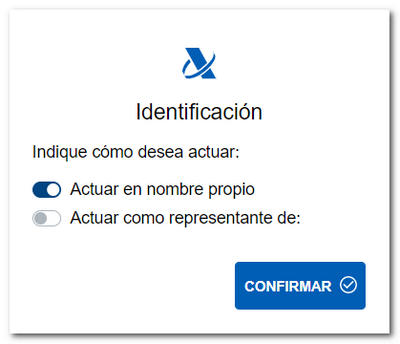
If you access with certificate or electronic DNI , the window with the certificates will be shown, select the one that corresponds to you to continue. In the next window, you have to indicate whether you are accessing on your own behalf or as a representative. Check the corresponding option and press "Confirm".
If you choose to identify yourself with Reference number , enter your DNI or NIE and the access reference for the current campaign or click "I don't have a Reference" to obtain a new one.

If you choose Citizen access EU( eIDAS ) you will be redirected to the Spanish node eIDAS where you will have to select the country where your identity was issued.
After identifying yourself through any of the four methods, you will have access to the tax data that the Tax Agency has on file for the year 2024.

You can also check your tax information through the APP-AEAT For mobile devices, by identifying yourself in the application with your tax reference number, Cl@veelectronic certificate or DNIe.