Free VERI*FACTU application from the AEAT
Skip information indexPossible technical errors and solutions
Error 403 is an identification error. It occurs when accessing a procedure that requires identification with a certificate orDNIemail and the internet browser you are using does not detect any signature.
Depending on the operating system, device, and browser you're using, you'll need to perform different checks. See the help section under "Content related to the 403 error." to obtain the necessary instructions on how to resolve this error.
You can also get help through the "Report an Incident (IT Support)" link in the 403 error message or through the "Assistance and Appointment" link in IT Support.
It is mandatory to indicate a single recipient when registering an invoice. When you click "Validate / Generate Invoice", the invoice is verified to be complete. If the invoice does not have a recipient, you will receive the following error: "You must add a recipient" in the "Recipient details" field.
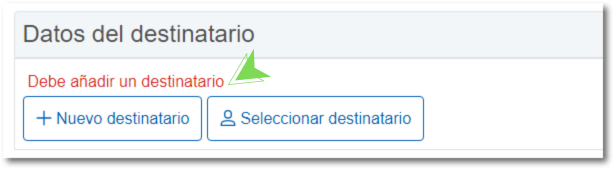
You should keep in mind that the billing application of the AEAT does not issue simplified invoices or tickets. Therefore, you must enter the recipient/customer information by clicking the "New Recipient" button and completing the required fields, or "Select Recipient" to select one from the previously created customer list. This is one of the requirements detailed in Order HAC/1177/2024, of October 18, in its article 19.