Information on the box from the previous year’s Renta return
To request the reference for the Income Tax file, it is necessary to provide the amount from box 505 of the 2024 Income Tax return submitted.
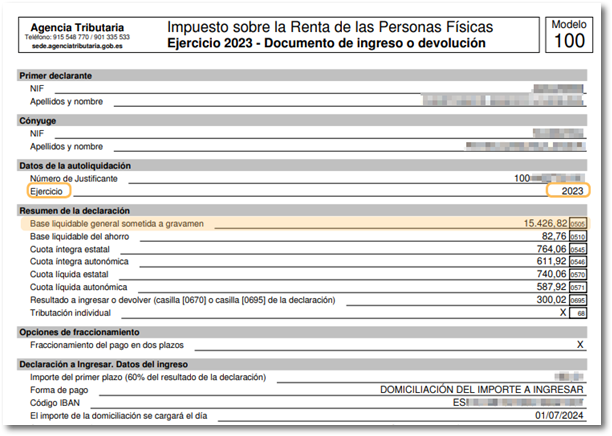
The box 505 the 2024 Income Tax return corresponds to the "General taxable base subject to taxation" and not with another amount nor with the result of the declaration.
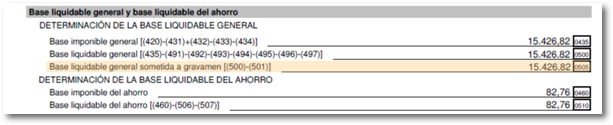
You can confirm the amount in box 505 of your tax return copy in the section “General net tax base and Savings net tax base”, or in the payment or refund document.
In the event that you do not file a tax return IRPFABBR corresponding to the 2024 fiscal year or if the amount is 0.00 you must indicate the last five digits of the code as a verification data IBAN of a bank account in which you are listed as the account holder.
If you have any questions about how to access the confirmed draft or the submitted 2024 Income Tax return, we recommend that you follow the steps detailed in the help section "How to obtain a copy of the 2024 Income Tax return" under "Income Tax - Technical Help".
Remember that you must provide the amount corresponding to the tax return that was finally filed; if the Administration has carried out a subsequent settlement, you must provide the corresponding information from box 505.
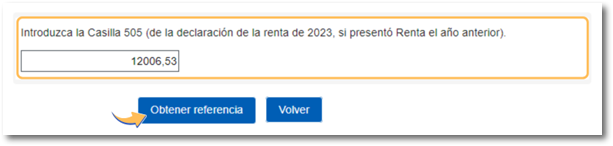
If an error appears regarding the format of the box, we remind you that in the field intended for box 505 you must indicate the whole number without any sign, separated by a comma (,) from the decimals, for example 20724.15 as shown in the images.
If you are unable to locate the correct amount in box 505 of the tax return filed for the 2024 tax year to request the draft reference, the alternatives available to you are:
-
Access the Income services through Cl@ve . It is an identification system that allows you to carry out procedures online based on agreed-upon keys with a limited validity period and that can be renewed whenever necessary. The system allows users to scan a QR code, which prevents the user from having to enter their identification data on the access screen. If you cannot scan the QR code, you can continue with the authentication by entering your DNI or NIE details plus the verification data or request a PIN that you will receive via SMS on your mobile phone. For more information, see the related help.
-
Have electronic certificate or eDNI . For more information on how to obtain an electronic certificate, see the related help.
-
Request an appointment at your local tax office so they can provide you with the 2025 Income Tax reference number. You can access this service until June 30, 2026 (end of the campaign period).