Procedures available in the AEAT APP
Skip information indexOther procedures: Registration of powers of attorney - Registration
The power of attorney granted allows any taxpayer to authorize a third party (natural or legal person) to carry out online, on their behalf, any of the procedures and actions in tax matters that are enabled by power of attorney.
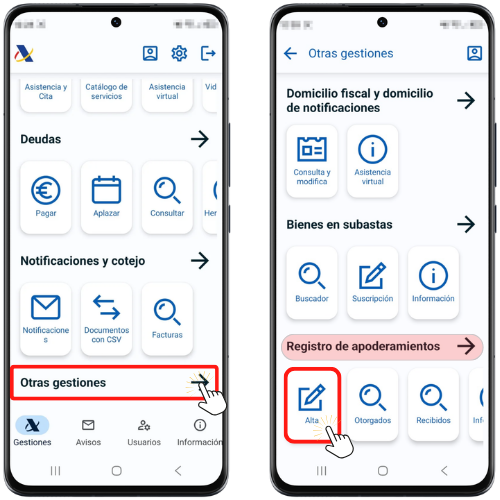
To register the power of attorney for tax procedures from the APP AEAT Select the "Procedures" option at the bottom, then go to the "Other procedures" section, "Registration of powers of attorney" and click "Registration".
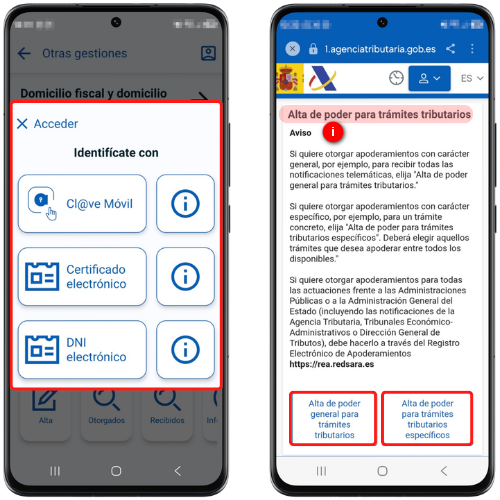
Identify yourself with Cl@ve Mobile Cl@ve, electronic certificate or ID card electronic (Android devices only).
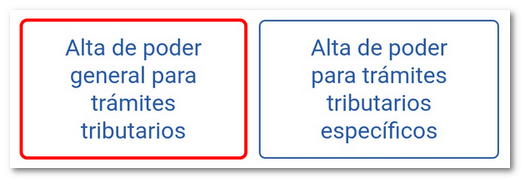
See the notice above. Next, choose the type of power of attorney between "General power of attorney for tax procedures" and "Power of attorney for specific tax procedures".
Registration of general power of attorney for tax procedures
Fill in the field "NIF/CIF "of the Attorney", select the code(s) for the procedures: "GENERALLEY58", "GENERALDATPE" and "GENERALNOT" and indicates the end date of the authorization. If the authorization end date is not changed, the duration of the power of attorney will be 5 years, this being the maximum duration of the power of attorney. Check the authorization box and press "Sign and Send."
Check the "I agree" box and click "Sign and Submit" to complete the power of attorney.
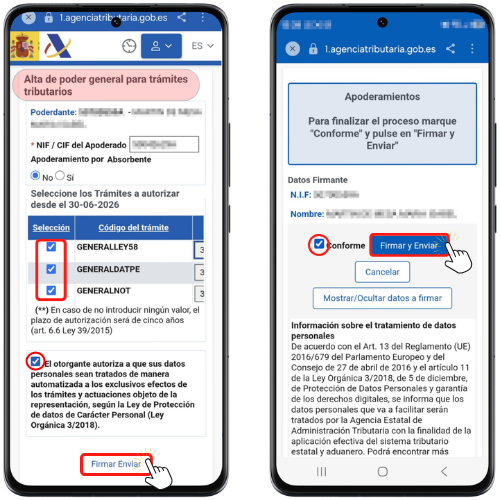
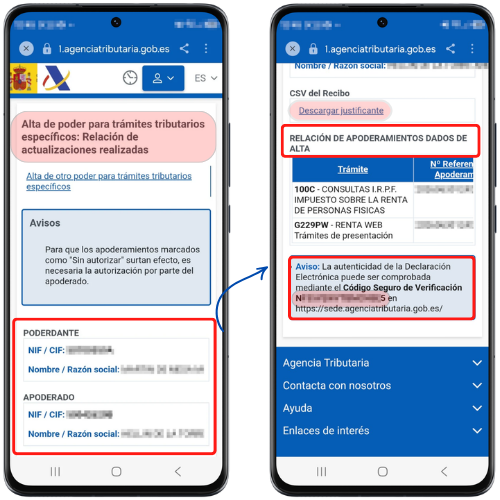
The response window will display the details of the principal, the attorney-in-fact, the list of registered powers of attorney, and the CSV (Secure Verification Code) which you can check in the "Notifications and verification" section, "Documents with CSV"of the APP" AEAT or in the "Document verification using secure verification code" section on the website.
Power of attorney for specific tax procedures
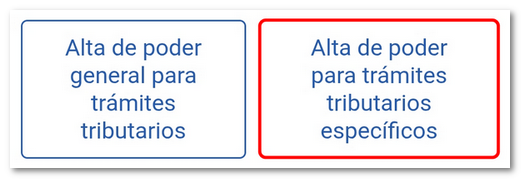
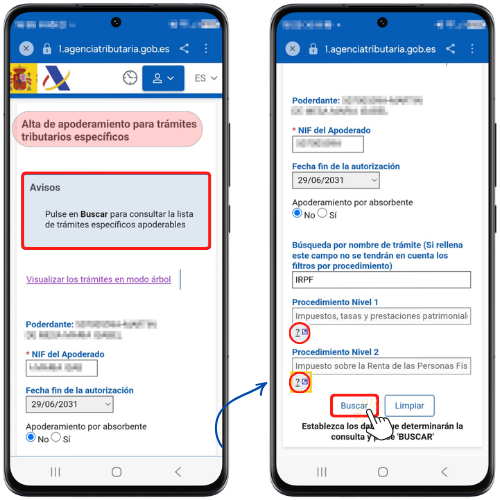
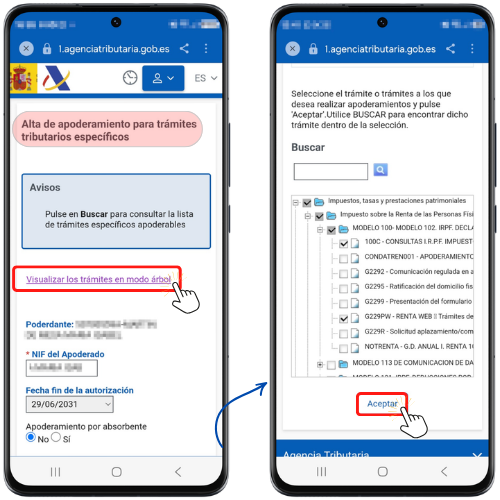
Fill in the field "NIF/CIF of the Attorney" and indicates the end date of the authorization and selects the code(s) of the procedures for which the power is granted.
You can search by the name of the procedure; however, if you do not enter any name, you can set a filter for the Level 1 procedure by clicking on the icon with the question mark "?".
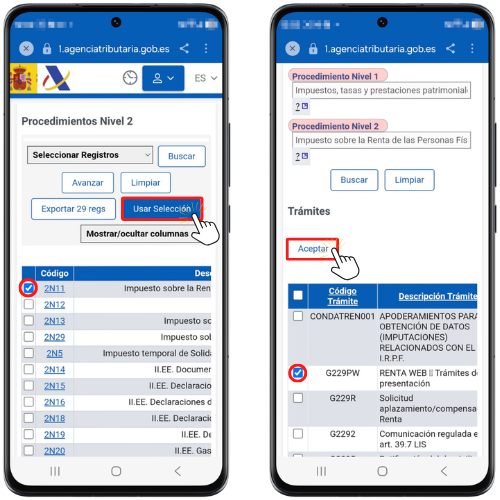
Select the appropriate option and click "Use Selection", then access the Level 2 procedure, select the appropriate option and click "Use Selection", in the next window click "Search" to select the specific procedures. Once you have selected the specific procedures, press "Accept".
You can also select the specific procedure(s) using the link "View procedures in tree view"
To expand the subcategories, click on the "+" sign of the corresponding folder. You can select an entire category or a specific subcategory. Once you have selected the procedure, press "Accept" at the bottom.
The procedures for which you have granted power of attorney will be displayed, and you will be able to modify the authorization end date (if the value on the previous screen has not been changed, the validity will be 5 years). Check the authorization box and press "Sign and Send."
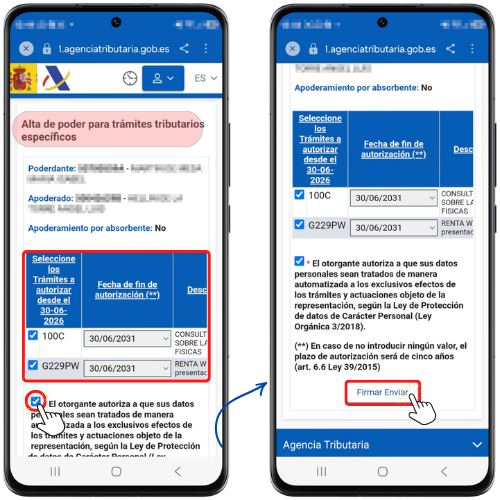
Check the "I agree" box and click "Sign and Submit" to complete the power of attorney.
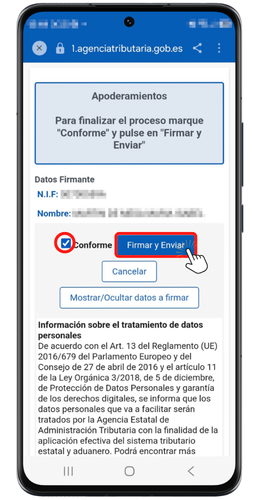
The response window will record the data of the grantor and attorney, the list of registered powers of attorney, and the codes CSV (both the general response and the specific ones for each power of attorney) which you can check in the "Notifications and verification" section, "Documents with CSV"of the APP" AEAT or in the "Document verification using secure verification code" section on the website.
You also have a link to "Download proof of payment".