Procedures available in the AEAT APP
Skip information indexOther procedures: Register of powers of attorney - Received
To consult, resign, extend or confirm your received powers of attorney, go to the "Procedures" section located at the bottom of the window, then access "Other procedures" and locate "Registry of powers of attorney" to click on "Received".
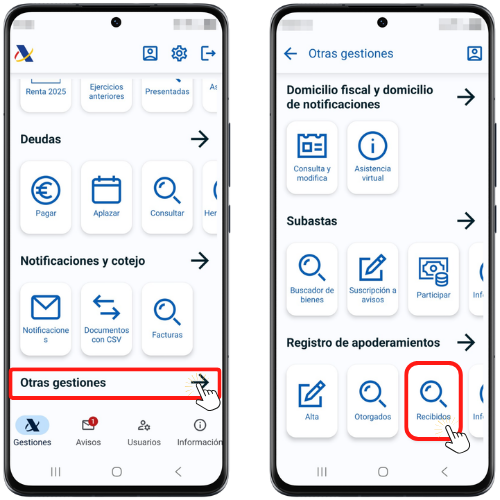
Query of received powers of attorney
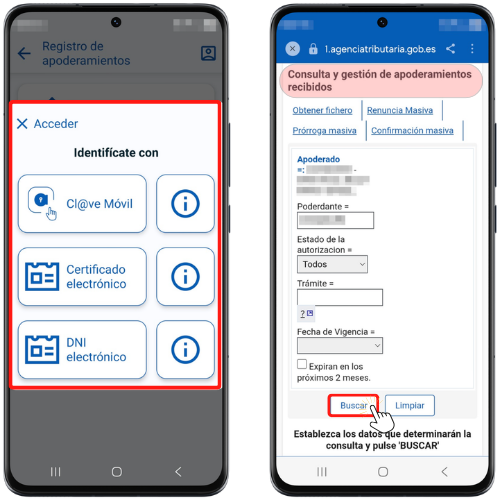
The attorney can view the powers of attorney received by accessing with Cl@ve Mobile Cl@ve, electronic certificate or ID card electronic (on Android systems).
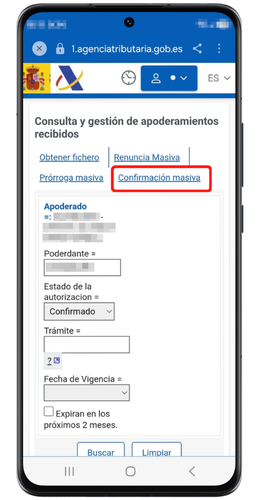
Once you have selected the type of access, you will obtain the window for consulting and managing received powers of attorney, where the NIF and the name or company name of the power of attorney will be indicated. You can filter your search by "Principal", "Authorization Status", "Process" and "Effective Date".
Press "Search"; The first 10 will be displayed, and if there are more results, click on "More" and "Next" to view the rest of the power of attorney. According to the current status, the following situations will appear: "Not Authorized", "Unconfirmed" or "Confirmed".
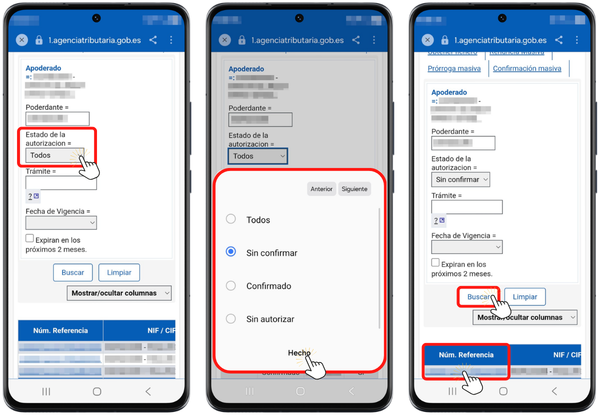
Confirmation of powers of attorney received
Currently, it is only necessary for the attorney to confirm the power of attorney that has been granted to him if it is a procedure related to notifications.
To confirm a power of attorney, click on the reference number of the power of attorney that is in the "Not Authorized" or "Unconfirmed" status. To help you in your search, you can set a filter and check "Unconfirmed" in the "Authorization Status" box.
In the next window, check all the details of the file, including the status of the power of attorney and the current status. Access the link "Confirm by the Attorney the power received" at the top, to continue with the process and press "Sign and Send" to continue.
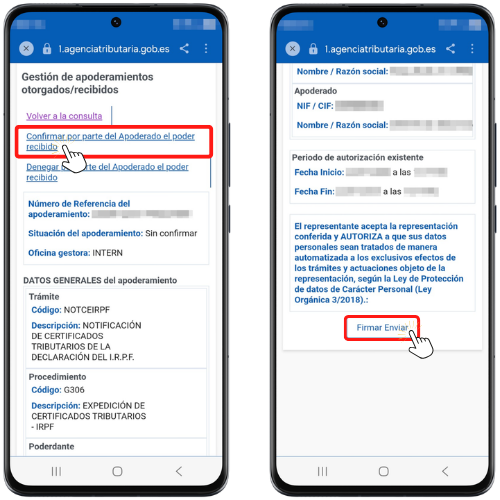
Then check the "I agree" box and click "Sign and Send" to complete the process.
You will get a CSV which can be checked in the section "Documents with CSV" located in "Procedures", "Notifications and verification" of the APP AEAT and download the confirmation receipt.
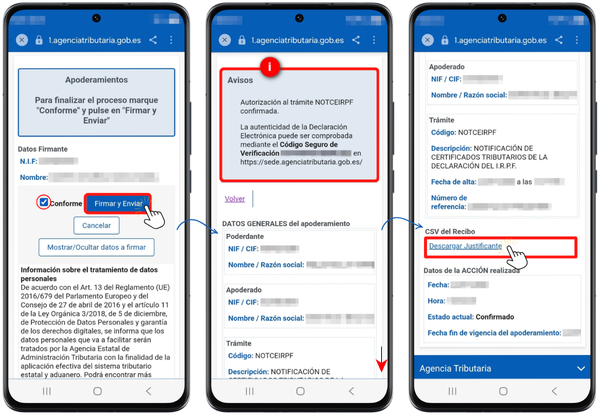
You also have the option of performing a "Mass confirmation"which allows you, as attorney, to confirm all the powers of attorney you have received that have been granted to you, relating to notifications.
Renunciation of powers of attorney received as an agent
The agent may renounce a power of attorney at any time provided that he/she proves to the Tax Agency that said renunciation has been reliably communicated to the represented party. Until that time, your registration will not be cancelled. Therefore, to renounce the power of attorney it will be necessary to attach a file in PDF format with the scanned copy of the burofax that the attorney sends to the principal informing him of the renunciation of the power of attorney registered in the Registry.
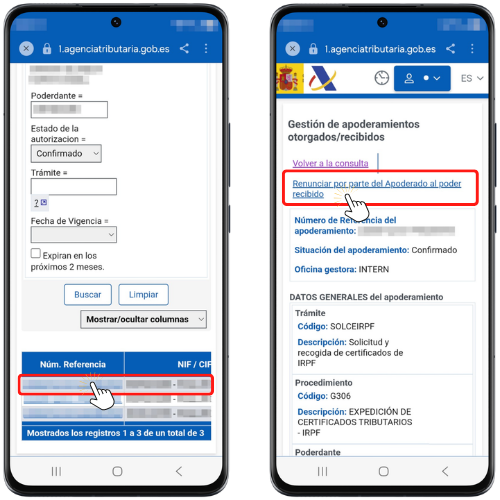
To resign, click on the power of attorney reference number.
In the next window, click "Renounce the power of attorney received by the Attorney-in-fact" if it is confirmed, or "Deny the power of attorney received" if it is unconfirmed.
Next, click on "Attach document" to select the burofax file.
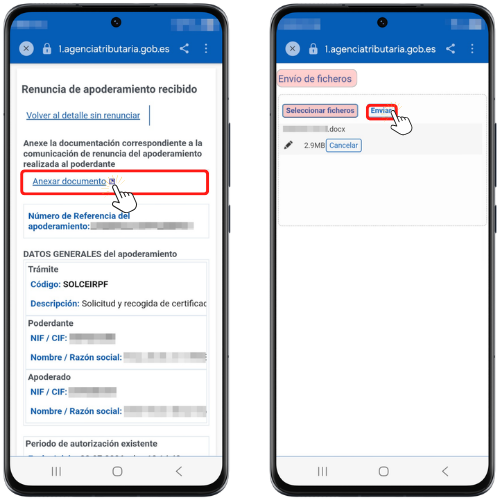
Once the document is attached, click "Sign and Send."
Check the "I agree" box and click "Sign and Send" to complete the process.
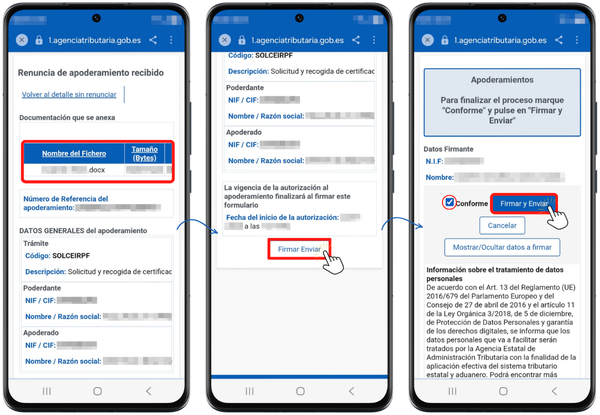
You will obtain authorization to process your resignation with a CSV which can be checked in the section "Documents with CSV" located in "Procedures", "Notifications and verification" of the APP AEAT.
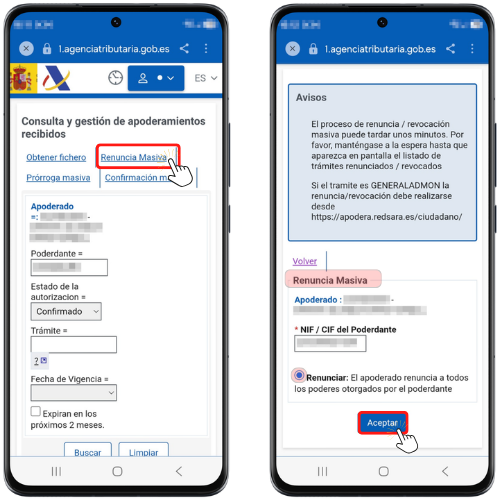
From "Mass resignation"You can resign all the powers of attorney of a given principal at once, instead of having to resign individually."
A new option has been enabled for "Mass extension"which allows, as an attorney, to extend powers of attorney received whose expiration is within the next two months.
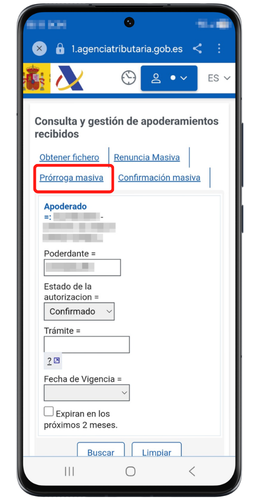
You can choose to renew them for 5 years or indicate the expiry date. You will need to sign a declaration of responsibility, by checking the box provided for this purpose.